
7 步搭建 Claude Agent 团队
从单人 Claude Code 会话,到多个 Agent 并行处理代码、测试、评审和文档。保留环境变量、提示词模板和 guardrails 配置。
写代码、做评审、跑测试、写 PR 、更新文档。每天都是一个任务接着一个任务。
但这 5 件事其实可以同时跑:每个任务交给一个 Agent,你继续处理下一个功能。
下面是 7 步搭建方法。
第 1 步:理解 3 个层级
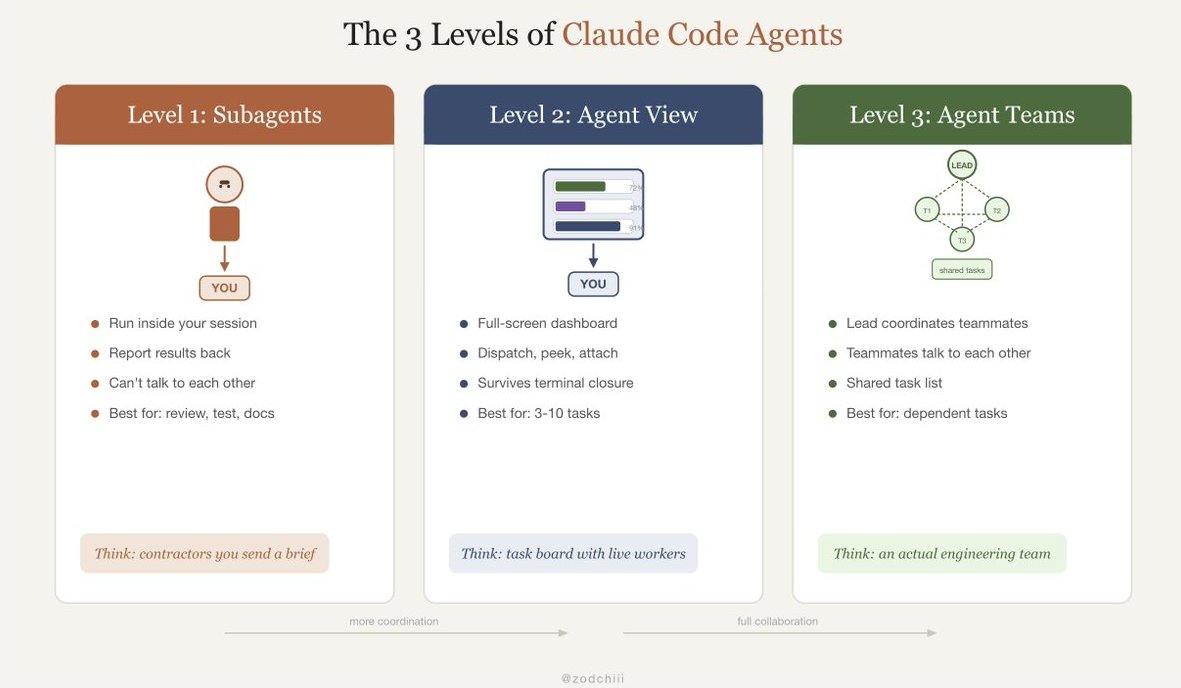
在搭团队之前,先要知道 Claude Code 里有哪些 Agent 能力。它们解决的问题不一样。
Level 1: Subagents
- 在当前会话里运行
- 把结果汇报回来
- 彼此之间不能通信
- 适合:可重复任务,比如 review 、 test 、 docs
- 可以理解成:拿着 brief 去干活的外包人员
Level 2: Agent View
- 全屏仪表盘,显示所有会话
- 可以分派任务、查看进度、接入任意 Agent
- 终端关闭后,会话仍然保留
- 适合:3 到 10 个互相独立的任务
- 可以理解成:带实时工作人员的任务看板
Level 3: Agent Teams
- 一个 lead agent 协调其他队员
- 队员之间可以互相通信
- 共享任务列表,真正协作
- 适合:跨文件、存在依赖关系的任务
- 可以理解成:一支真正的工程团队
很多人停在 Level 1 。这里直接搭到 Level 3 。
第 2 步:启用 Agent Teams
Agent Teams 还是实验功能,需要先打开:
# Add to ~/.zshrc or ~/.bashrc
export CLAUDE_CODE_EXPERIMENTAL_AGENT_TEAMS=1
export CLAUDE_CODE_SUBAGENT_MODEL="claude-sonnet-4-5-20250929"
export CLAUDE_CODE_DEFAULT_EFFORT=high
export CLAUDE_CODE_DISABLE_ADAPTIVE_THINKING=1
把下面这行加入 ~/.zshrc(Mac)或 ~/.bashrc(Linux),之后每次都会自动启用:
export CLAUDE_CODE_EXPERIMENTAL_AGENT_TEAMS=1
第 3 步:写第一个团队提示词
和普通提示词最大的区别是:描述完整项目,然后让 lead agent 自己拆解。
I need to build a user authentication system. Spawn separate agents to handle:

1. Backend: Create Express.js routes for login, signup, and token refresh
2. Frontend: Build React login and signup forms with validation
3. Testing: Write integration tests for all auth endpoints
4. Review: Review all code produced by the other agents for security issues
lead agent 会把任务拆开、分配角色、启动队友。每个队友都有自己的上下文窗口。你会看到哪些 Agent 正在运行,以及它们各自在做什么。
第 4 步:用模型路由控制成本
5 个 Opus Agent 并行,token 消耗也会接近 5 倍。更合理的做法是给团队做路由:
# Lead agent: Opus (needs to reason about architecture)

# Teammates: Sonnet (focused execution tasks)
export CLAUDE_CODE_SUBAGENT_MODEL="claude-sonnet-4-5-20250929"
lead agent 使用当前模型,比如复杂任务用 Opus 。所有队友自动使用 Sonnet,成本大约是 1/5 。对聚焦任务来说,质量够用,花费低很多。

第 5 步:用 Agent View 管理所有会话
团队跑起来后,切到仪表盘:
claude agents
全屏视图会显示每个会话:
┌─────────────────────────────────────────────┐
│ Agent View                                  │
├──────────┬──────────┬───────────────────────┤
│ Backend  │ Frontend │ Testing    │ Review   │
│ ██████░░ │ ████░░░░ │ ░░░░░░░░░ │ waiting  │
│ 72%      │ 48%      │ queued     │ for deps │
├──────────┴──────────┴───────────────────────┤
│ > dispatch new task                         │
└─────────────────────────────────────────────┘
在这里可以做几件事:
- Dispatch:给团队分派新任务
- Peek:不打断 Agent,只查看进度
- Attach:某个 Agent 需要输入时,接入处理
- Close your laptop:合上电脑后,Agent 继续工作,会话不会因为终端关闭而消失
第 6 步:建立决策框架
并非每个任务都需要团队。简单任务上 Agent 会浪费 token 。
可以按下面的方式选:
Single prompt, single file fix
→ Regular Claude Code session. No agents needed.

3 independent tasks, no dependencies
→ Agent View. Dispatch all 3, check results when done.

Repeatable workflow (review, test, docs)
→ Subagents with YAML config. Consistent every time.

Multi-file feature with dependencies
→ Agent Teams. Lead coordinates, teammates collaborate.

Overnight backlog drain
→ Headless mode with --max-budget-usd cap.
选错编排模式,会同时浪费时间和 token 。独立任务不需要 Agent Teams 协调;有依赖的任务也不适合丢进彼此隔离的 Agent View 会话里。
第 7 步:加上 guardrails
多个 Agent 并行时,多个问题也可能同时出现。需要把权限收紧:
{
  "permissions": {
    "allow": [
      "Read", "Glob", "Grep", "LS", "Edit",
      "Write(src/**)", "Write(tests/**)",
      "Bash(npm test *)", "Bash(npx tsc *)",
      "Bash(git add *)", "Bash(git commit *)"
    ],
    "deny": [
      "Read(**/.env*)", "Read(**/.ssh/**)",
      "Bash(rm -rf *)", "Bash(sudo *)",
      "Bash(git push *)", "Bash(npm publish *)"
    ],
    "defaultMode": "acceptEdits"
  }
}
同时给团队会话设置预算上限:
claude -p "build the auth system" --max-budget-usd 15.00
5 个 Agent,每个 3 美元,总预算就是 15 美元。不会出现某个 Agent 一直跑、把预算烧穿的情况。
完整配置:可以直接复制
环境变量
# Add to ~/.zshrc or ~/.bashrc
export CLAUDE_CODE_EXPERIMENTAL_AGENT_TEAMS=1
export CLAUDE_CODE_SUBAGENT_MODEL="claude-sonnet-4-5-20250929"
export CLAUDE_CODE_DEFAULT_EFFORT=high
export CLAUDE_CODE_DISABLE_ADAPTIVE_THINKING=1
团队提示词模板
I need to [describe the full feature].

Spawn separate agents:
1. [Role 1]: [specific task with files/modules]
2. [Role 2]: [specific task with files/modules]
3. [Role 3]: [specific task with files/modules]
4. Review: Review all code for [bugs/security/style]

Each agent works in its own context. Coordinate through the shared task list. Flag dependencies before starting dependent tasks.
settings.json 里的 guardrails
{
  "permissions": {
    "allow": ["Read", "Glob", "Grep", "Edit", "Write(src/**)", "Write(tests/**)"],
    "deny": ["Read(**/.env*)", "Bash(rm -rf *)", "Bash(git push *)"],
    "defaultMode": "acceptEdits"
  }
}
前后对比
BEFORE (solo):
- One task at a time
- You write, review, test, commit, all sequential
- A 4-part feature takes a full day
- Context bloats as you switch between tasks

AFTER (agent team):
- 4 agents work in parallel
- Backend, frontend, tests, review running simultaneously
- Same feature done in 2 hours
- Each agent has clean, focused context
- You review and merge the results
同一个工具,同一个订阅。区别只是一个环境变量,以及提示词里写清楚:spawn separate agents。